Freebies Science Links Math Links Home

Tuesday, August 21, 2012

Teacher Week: Technology Tip Tuesday

Teacher Week: Technology Tip Tuesday


I am sitting here wracking my brain about what I can share with teachers using technology.  I am not an expert, but I do okay. I couldn't come up with anything.

 I decided to share how to make great looking letters for bulletin board using your computer...that counts right???  Many people now use die-cut machines like Cameos and Cri-cuts.  You don't need fancy tools to create something like this....


1.  Choose a bold font that you like.  I set the page as landscape, I used SAF 
and size was 550.  You have to type it in yourself...my computer only goes up to 72.

2.  Type out your words, highlight and click on text effects, the outlined blue A on the tool bar.  Choose outline and line effects.  You can also right click, go to fonts and click on text effects at the bottom.
3.  Click on text fill and choose no fill.  Click on text line black.  Click on weights and arrows. I chose solid line and 4 point, it is your preference on colors and lines.  I choose thicker lines, so I can cut them out and still have some black showing.


5.  You are ready to print!  I added some scraps of paper and stitching using a sharpie marker.  I made this on foam board.

I hope this technology tip will help someone out there!

I'm posting for  Blog Hoppin' for Teacher Week!!!
{if you want to link up too, just right click the picture and save it to your computer}


Monday, August 20, 2012

Teacher Week: Monday Must-Haves


Must-haves Monday

1.  The personal laminator...I have one at home and school!  I take many trips to BJ's for pouches.
2.  A new box of Mr. Sketch Markers and a pack of colored flairs.  There is nothing like a marker with a brand new tip!
3.  A great collection of resources that have changed my teaching forever.
  • Daily 5 and CAFE
  • Book Whisperer
  • Mosaic of Thought and Strategies That Work
  • Guided Math
  • Pinterest
  • TPT and Teacher's Notebook


4.  My school bag from 31.  I love how it keeps me super organized and holds files!  I bought another one to keep in my car with things for traveling.


5.  I love my classroom library and how much my students enjoy reading! My #1 goal is to create a class of voracious readers.  

6.  Things that are cute make me super happy!


I'm posting for  Blog Hoppin' for Teacher Week!!!
{if you want to link up too, just right click the picture and save it to your computer}


Sunday, August 19, 2012

Let's Get to the Point!


Let's Get to the Point!

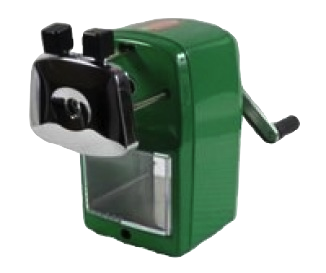
I have to confess that I have a crazy obsession with pencil sharpeners.  I love a sharp pencil but it drives me insane listening to the sound of an electric sharpener.  I only allow my students to sharpen their pencils at the beginning and end of the day...they each have four pencils.  I have a manual sharpener on my wall that literally eats pencils and I have gone through at least four electric ones.  I am willing to try anything and for any amount of money!!!!

I have seen this retro-looking sharpener on many teaching blogs, Facebook and Pinterest.  I have read all the rave reviews and I finally decided to check it out for myself.  I ordered one to review and my new sharpener showed up last week....and in my favorite color, KELLY GREEN!  I have to say that I was not disapPOINTed!

I have found the perfect sharpener for my room!  It is quiet! It sharpens like no other!  It sharpens all types of pencils!  The tips are super sharp and do not break off (even with a little extra pressure).  It is very affordable for any teacher's budget. can't wait to get back to school with my new little toy.  The kids are going to love it!


Pictures below show my electric sharpener on the left and my new one on the right:


Head over to Classroom Friendly Supplies to order one or find other feedback on this tool if you need more convincing!  The sharpeners are so popular they sell out quickly, so don't wait too long.

Saturday, August 18, 2012

Easy as Pie- Author's Purpose


I love PIE!!!  I use this acronym all year with my students.  I refer to the posters during my reading and writing workshops.  The picture on the left is from last year and I added the PIE pans on the right this year.  I enlarged the letters on the computer and printed.  I added background paper and letters to aluminum pie pans.  I hang a lot of things on thick ribbon from the dropped ceiling.  I think they came out pretty cute.


Freebie
Project


Here are some free printables that I have found.
Free Posters from http://mrsgilchristsclass.blogspot.com
Freebie From Classroom Confections

Tuesday, August 14, 2012

Our Reading Hits!


I created a binder for "Our Reading Hits" or book recommendations.  I printed genre posters on white card-stock from a few blogs to cover all the different ones in our standards: bethnewinghammrsrhodesscholars, dots-n-spots .  Due to limited wall space, I love the idea of putting them in a binder as a reference.
I printed out recommendation sheets from the blog: create*teach*share
I typed up a sheet of labels with names of all the genres to stick on the top of each recommendation sheet.  The book will be placed in my classroom library.

I was inspired by post on teachingwithatouchoftwang.  I bought the paper towel holder and I didn't like how my sheets hung on it...they were all flopping over.  I tried all sorts of things to fix it and came up with Plan B.  My other concern with this design was the space it would take up on my counter.